From Monitoring to Hunting: Creating Custom Detection Logic
After mastering File Integrity Monitoring and forensic analysis in Parts 2-4, I reached a critical realization: pre-built rules only detect known patterns. Real security operations require the ability to create custom detection logic tailored to specific threats and organizational contexts.
In this phase of my homelab project, I moved beyond passive monitoring into active threat detection by creating custom correlation rules. My objective was to detect SSH brute-force attacks using aggregation logic—a fundamental technique used in every production SOC.
The Problem: Alert Fatigue from Individual Events
Wazuh's default rules detect individual SSH authentication failures. Every failed password attempt generates an alert. While this captures the raw data, it creates massive noise:
- Single typo by legitimate user? Alert.
- Automated scanner probing the network? 1,000 alerts.
- Actual brute-force attack? Buried in the noise.
This is the classic alert fatigue problem. When everything is an alert, nothing is actionable.
The Solution: Aggregation and Correlation
Professional SIEM deployments use correlation rules that aggregate events over time windows. Instead of alerting on every failure, the logic becomes:
"If you see Rule X happen Y times in Z seconds from the same source, escalate to Level 10 (Critical)."
This transforms noise into intelligence. A single failed password is information. Eight failures in 60 seconds from the same IP? That's a brute-force attack.
Understanding the Detection Logic
Rule Anatomy: Correlation Components
I needed to create a custom rule that watches for patterns, not individual events. Here's the detection logic I designed:
- Watch For: SSH authentication failures (base rule)
- Count: 8 occurrences (later optimized to 5)
- Time Window: 60 seconds
- Constraint: Must come from the same source IP
- Action: Generate Level 10 alert with MITRE ATT&CK mapping
This is frequency-based correlation—one of the most powerful detection techniques in SIEM operations.
Creating the Custom Rule
Step 1: Setting Up the Local Rules File
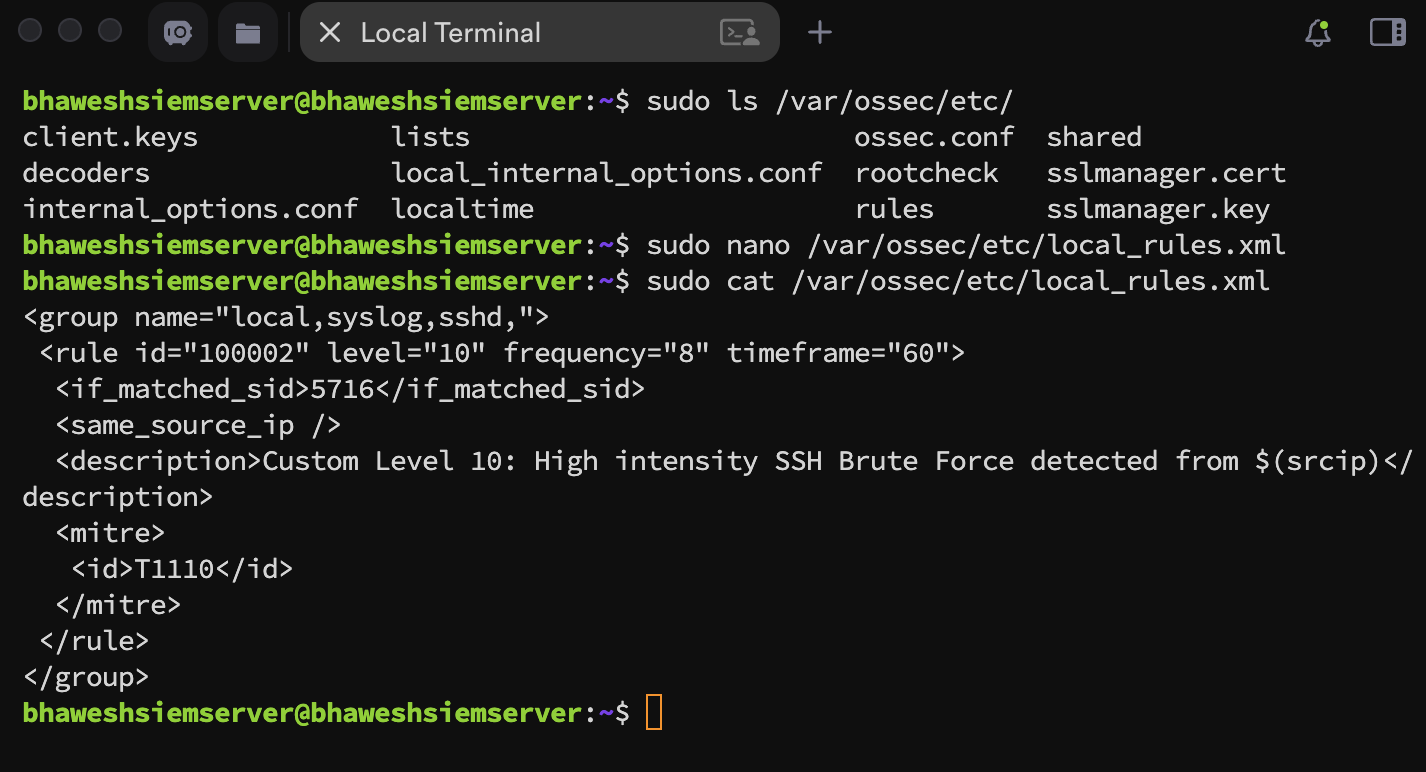
Wazuh stores custom rules in /var/ossec/etc/rules/local_rules.xml. This file didn't exist in my fresh installation, so I created it on my SIEM manager:
sudo nano /var/ossec/etc/rules/local_rules.xml
I added the following XML rule definition:
<group name="local,syslog,sshd,">
  <rule id="100002" level="10" frequency="8" timeframe="60">
    <if_matched_sid>5716</if_matched_sid>
    <same_source_ip />
    <description>Custom Level 10: High intensity SSH Brute Force detected from $(srcip)</description>
    <mitre>
      <id>T1110</id>
    </mitre>
  </rule>
</group>
**
Understanding the Rule Syntax
Let me break down each component:
<rule id="100002" level="10">
- Custom rule IDs start at 100000 to avoid conflicts with default rules
- Level 10 = Critical severity (immediate SOC attention required)
frequency="8" timeframe="60"
- The rule only fires after the 8th occurrence within 60 seconds
- This prevents false positives from occasional typos
<if_matched_sid>5716</if_matched_sid>
- Watches for Wazuh's built-in Rule 5716 (generic SSH authentication failure)
- This is the "parent" rule we're correlating against
<same_source_ip />
- Critical constraint: only count failures from the same attacker
- Prevents unrelated failures from different IPs triggering the rule
<description>...$(srcip)</description>
- Dynamic variable
$(srcip)shows which IP is attacking - Provides immediate context in the alert
<mitre><id>T1110</id></mitre>
- Maps to MITRE ATT&CK T1110: Brute Force
- Tactic: Credential Access
- Provides standardized threat intelligence context
Step 2: Activating the Rule
After saving the file, I restarted the Wazuh manager to load the custom rule:
sudo systemctl restart wazuh-manager
**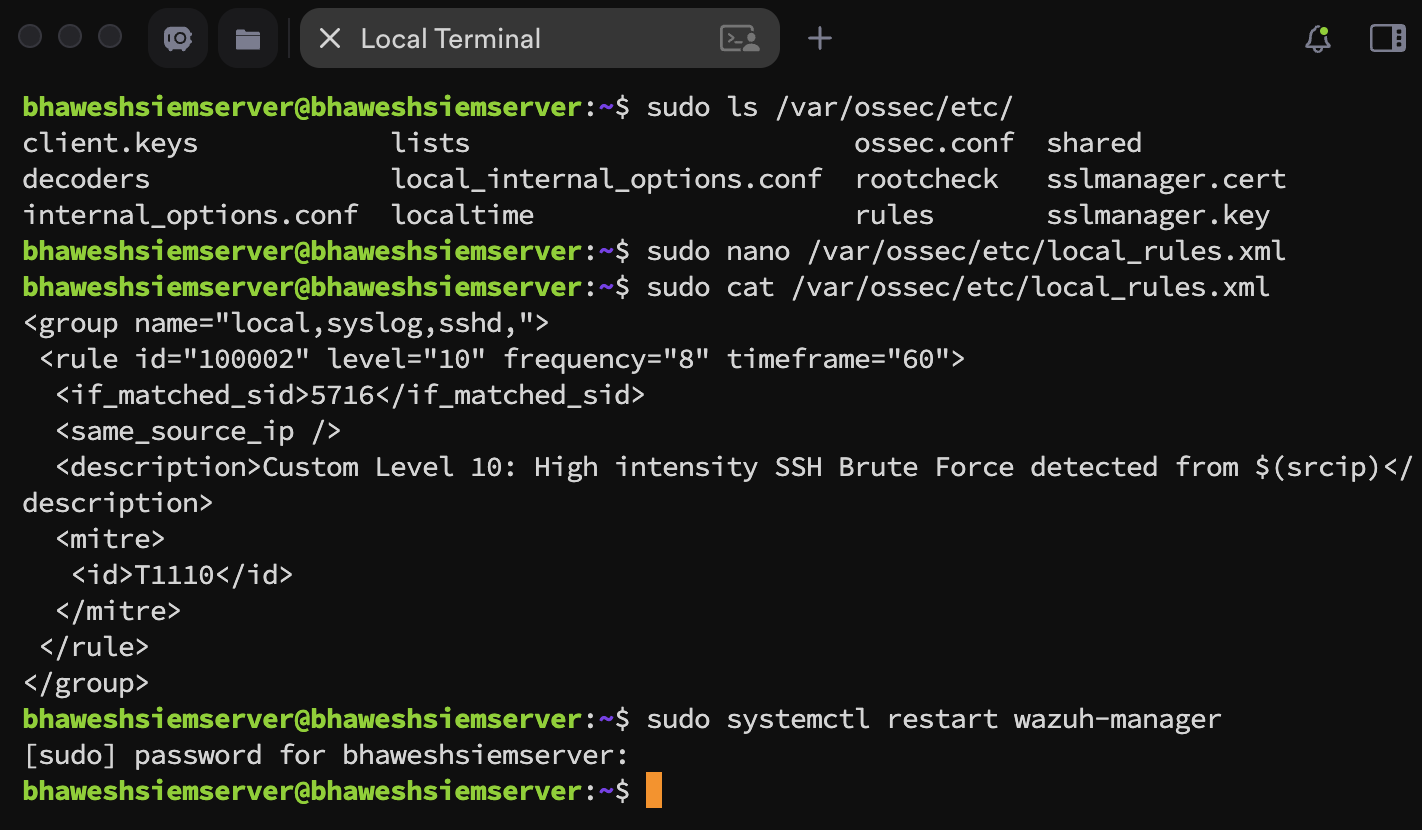
The custom rule was now active and monitoring for SSH brute-force patterns.
Simulating the Attack: Red Team Perspective
To validate the detection rule, I needed to simulate a real brute-force attack. I switched to my Kali Linux VM to act as the attacker.
Preparing the Attack
First, I created a password list containing intentionally incorrect passwords:
echo -e "123456\npassword\nadmin123\nroot\ntoor\nqwerty\nletmein\nfail1\nfail2\nfail3" > passlist.txt
This list ensures multiple authentication failures—exactly what my correlation rule is watching for.
Launching the Brute-Force with Hydra
I used Hydra, a popular password cracking tool, to automate the attack:
hydra -l root -P passlist.txt ssh://192.168.64.4 -t 4 -V
Command Breakdown:
-l root: Target the root user account-P passlist.txt: Use my list of incorrect passwordsssh://192.168.64.4: Target my SIEM manager's SSH service-t 4: Run 4 parallel authentication attempts (accelerates failure rate)-V: Verbose mode to see each attempt
**
The SSH Configuration Problem
The attack immediately failed with: "target does not support password authentication"
Root Cause: My SIEM server was configured for SSH key-based authentication only (using the passphrase I set up in Part 1). This is more secure than passwords, but it prevents password-based brute-force testing.
To simulate a realistic attack scenario, I needed to temporarily enable password authentication.
Enabling Password Authentication
I logged into my SIEM server and modified the SSH configuration:
sudo nano /etc/ssh/sshd_config
I located and changed:
PasswordAuthentication no
To:
PasswordAuthentication yes
**
I restarted the SSH service:
sudo systemctl restart ssh
Second Attempt: Still Blocked
I launched Hydra again, but it still failed.
**
The Hidden Override: I discovered that the sshd_config file contains this line:
Include /etc/ssh/sshd_config.d/*.conf
This means files in the sshd_config.d/ directory can override the main config. I checked:
ls /etc/ssh/sshd_config.d/
Found: 50-cloud-init.conf
Inside this file: PasswordAuthentication no
This cloud-init configuration was overriding my change. I edited it:
sudo nano /etc/ssh/sshd_config.d/50-cloud-init.conf
Changed to: PasswordAuthentication yes
**
Restarted SSH again:
sudo systemctl restart ssh
Third Attempt: Attack Successful
I launched Hydra once more, and this time it worked as expected:
**
Perfect! Multiple failed authentication attempts were being logged. Now to check if my custom rule detected them.
Analyzing the Detection Results
First Detection: Default Rule, Not Custom
I opened the Wazuh dashboard and navigated to Threat Intelligence → Threat Hunting → Events.
**
What I Observed:
- ✅ Rule 5763 fired: "sshd: brute force trying to get access" (Level 10)
- ✅ Rule 5760 fired multiple times: Individual authentication failures
- ❌ Rule 100002 (my custom rule): Did not fire
The Problem: My custom rule was watching for Rule 5716, but the server was actually generating Rule 5760 alerts.
Understanding the Rule ID Mismatch
Different Linux distributions trigger different SSH authentication failure rules:
- Ubuntu/Debian systems often trigger Rule 5760
- RHEL/CentOS systems might trigger Rule 5716
- Other variants exist for different SSH configurations
Because Rule 5716 never fired, my custom correlation rule never started counting. This is a common challenge in SIEM rule development—assumptions about base rules don't always match reality.
Fixing the Rule: Correcting the Parent Rule ID
I edited my custom rule to watch for the correct parent rule:
sudo nano /var/ossec/etc/rules/local_rules.xml
Changed:
<if_matched_sid>5716</if_matched_sid>
To:
<if_matched_sid>5760</if_matched_sid>
**
Restarted the manager:
sudo systemctl restart wazuh-manager
I launched the attack again:
**
Second Detection Attempt: Still Missing
I checked the dashboard again, but my custom rule still didn't fire.
The Problem: Rule conflict with default detection.
Wazuh's built-in Rule 5763 (brute-force detection) was firing first and consuming the alert. My custom rule never got a chance to aggregate because the default rule already escalated the event.
The Solution: Be Faster Than Default
I needed my custom rule to trigger before the default brute-force rule. I reduced the frequency threshold:
Changed:
frequency="8"
To:
frequency="5"
This means my rule now fires after 5 failures in 60 seconds instead of 8, beating the default rule's threshold.
I restarted the manager and launched the attack one final time.
Success: Custom Rule Detection Confirmed
I checked the dashboard and finally saw what I was looking for:
**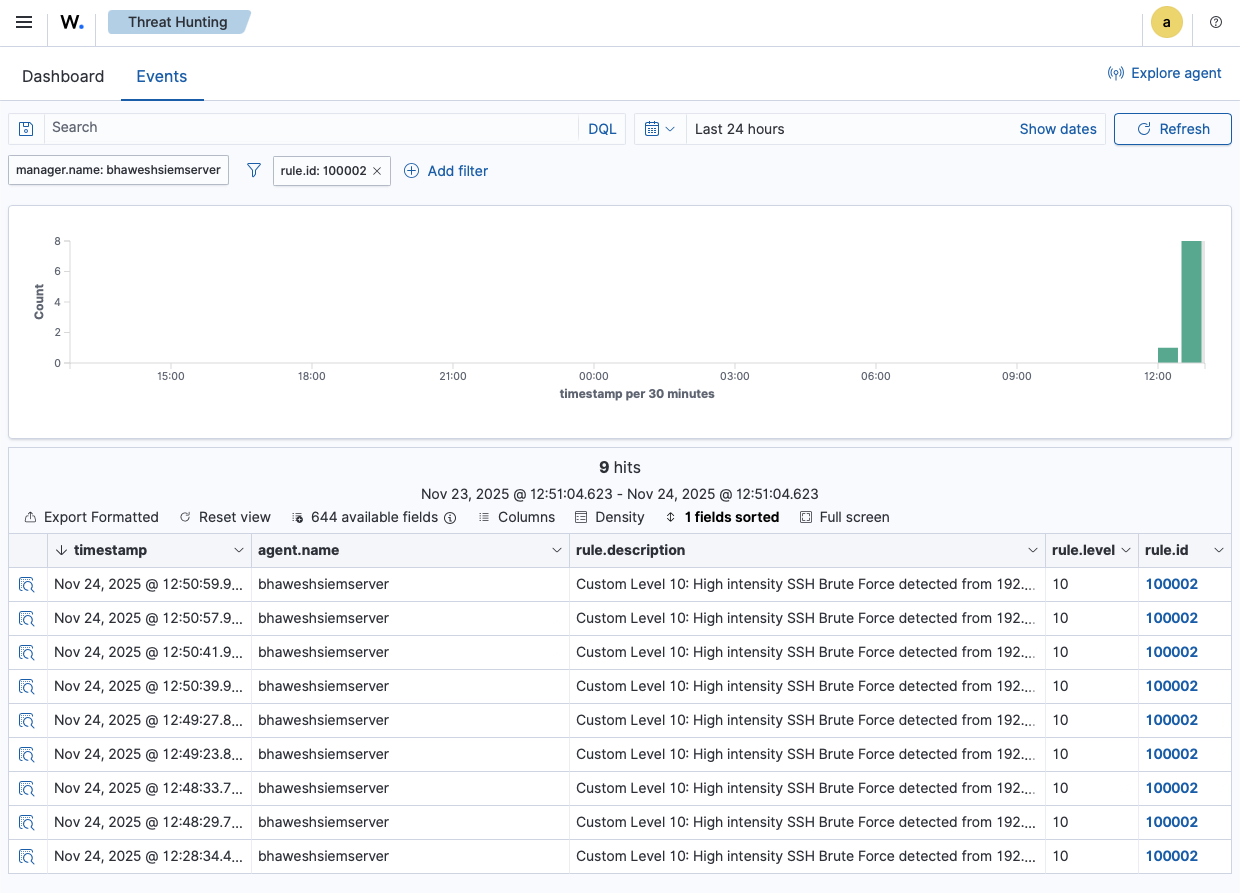
Success! My custom correlation rule fired with:
- Rule ID: 100002
- Description: "Custom Level 10: High intensity SSH Brute Force detected from 192.168.64.3"
- Severity: Level 10 (Critical)
- MITRE Mapping: T1110 - Brute Force
Deep Dive: Alert Forensic Analysis
Let me analyze the JSON alert generated by my custom rule:
{
  "rule": {
    "id": "100002",
    "level": 10,
    "description": "Custom Level 10: High intensity SSH Brute Force detected from 192.168.64.3",
    "firedtimes": 8,
    "frequency": 5,
    "groups": ["local", "syslog", "sshd"],
    "mitre": {
      "technique": ["Brute Force"],
      "id": ["T1110"],
      "tactic": ["Credential Access"]
    }
  },
  "data": {
    "srcip": "192.168.64.3",
    "dstuser": "root",
    "srcport": "43798"
  },
  "previous_output": "Nov 24 07:05:59 bhaweshsiemserver sshd[14166]: Failed password for root from 192.168.64.3 port 43784 ssh2\nNov 24 07:05:57 bhaweshsiemserver sshd[14165]: Failed password for root from 192.168.64.3 port 43768 ssh2..."
}
Key Forensic Elements
Attack Attribution:
- Source IP:
192.168.64.3(my Kali attacker VM) - Target User:
root(high-value target) - Source Port:
43798(random ephemeral port from attacker)
Detection Metadata:
- Fired Times: 8 (the rule has triggered 8 times total since manager start)
- Frequency Threshold: 5 (fires after 5 occurrences)
- Rule Groups:
local,syslog,sshd(categorization for filtering)
MITRE ATT&CK Context:
- Technique: Brute Force (T1110)
- Tactic: Credential Access (attacker attempting to gain valid credentials)
This maps to the adversary attempting to gain initial access through credential guessing
Historical Context: The previous_output field shows the aggregated failed attempts that triggered the rule:
Nov 24 07:05:59 ... Failed password for root from 192.168.64.3 port 43784Nov 24 07:05:57 ... Failed password for root from 192.168.64.3 port 43768Nov 24 07:05:57 ... Failed password for root from 192.168.64.3 port 43798Nov 24 07:05:57 ... Failed password for root from 192.168.64.3 port 43812
Skills Mastered: Custom Detection Engineering
Through this exercise, I developed critical detection engineering capabilities:
- Correlation Logic Design
- Understanding aggregation vs. individual event detection
- Defining appropriate frequency thresholds
- Setting meaningful time windows
- Constraining correlation by source/destination/user
- SIEM Rule Syntax
- XML rule structure and hierarchy
- Parent rule references (
if_matched_sid) - Dynamic variables (
$(srcip)) - MITRE ATT&CK framework integration
- Detection Tuning
- Identifying rule conflicts with defaults
- Adjusting thresholds to optimize detection timing
- Balancing false positive reduction with detection sensitivity
- Testing and validating rule effectiveness
- Red Team / Blue Team Integration
- Simulating realistic attacks for detection validation
- Understanding attacker tools (Hydra)
- SSH security configuration trade-offs
- Validating detection through operational testing
- Troubleshooting Detection Gaps
- Identifying why rules don't fire
- Understanding rule ID variations across distributions
- Analyzing alert precedence and conflicts
- Iterative testing and refinement
Real-World Application: SOC Detection Engineering
This custom rule creation directly mirrors professional SOC workflows:
Threat Intelligence Team: Receives intel about new attack technique ↓ Detection Engineer: Creates custom correlation rule ↓ Red Team: Validates detection through simulated attack ↓ Blue Team Analyst: Tunes thresholds based on environment ↓ Production Deployment: Rule pushed to all agents via centralized config
The skills I developed—correlation logic, rule syntax, detection tuning, and red team validation—are core competencies for security detection engineers.
Key Lessons Learned
- Default Rules Aren't Enough Pre-built detection rules cover common scenarios, but custom rules are essential for:
- Organization-specific threats
- Unique infrastructure patterns
- Advanced persistent threats
- Regulatory compliance requirements
- Assumptions Must Be Validated I assumed Rule 5716 would fire, but Rule 5760 did instead. Always validate base rule IDs through operational testing before deploying correlation rules.
- Rule Conflicts Are Common Multiple rules can match the same event. Understanding precedence, timing, and threshold differences is critical for effective detection.
- Tuning Is Iterative My frequency threshold went from 8 → 5 through testing. Detection engineering requires continuous refinement based on false positive rates and attack patterns.
- Context Matters More Than Alerts The
previous_outputfield transforms a generic "brute force detected" into "here are the 5 specific failed attempts from this IP targeting root." Context enables investigation.
The Detection Engineering Workflow
I've now mastered the complete detection rule lifecycle:
Phase 1: Threat Research ✅
- Understand attack technique (SSH brute-force)
- Identify indicators of compromise (repeated failures)
- Map to MITRE ATT&CK framework
Phase 2: Detection Logic Design ✅
- Define correlation parameters (frequency, timeframe)
- Specify constraints (same source IP)
- Set appropriate severity level
Phase 3: Rule Implementation ✅
- Write XML rule syntax
- Configure parent rule dependencies
- Add MITRE ATT&CK mapping
Phase 4: Validation Testing ✅
- Simulate attack with offensive tools
- Verify rule fires correctly
- Analyze generated alerts
Phase 5: Tuning and Optimization ✅
- Adjust thresholds based on results
- Resolve rule conflicts
- Optimize detection timing
Phase 6: Production Deployment ✅
- Deploy via centralized configuration
- Monitor false positive rates
- Iterate based on operational feedback
Conclusion
Creating custom correlation rules transformed my SIEM homelab from a passive monitoring system into an active threat detection platform. I can now:
- Design correlation logic for complex attack patterns
- Implement custom rules using Wazuh's XML syntax
- Validate detection through red team simulation
- Tune rules to balance sensitivity and noise
- Map detections to MITRE ATT&CK framework
- Troubleshoot detection gaps systematically
This is the shift from "my SIEM generates alerts" to "I engineer custom detection logic for specific threats."
The ability to create, test, and deploy custom detection rules is what separates SIEM operators from security detection engineers.